MulliganOS Cloud runs on the computers, tablets and phones your course already has. Nothing to install. Golfers book and pay online, and every booking lands on the sheet your staff see.
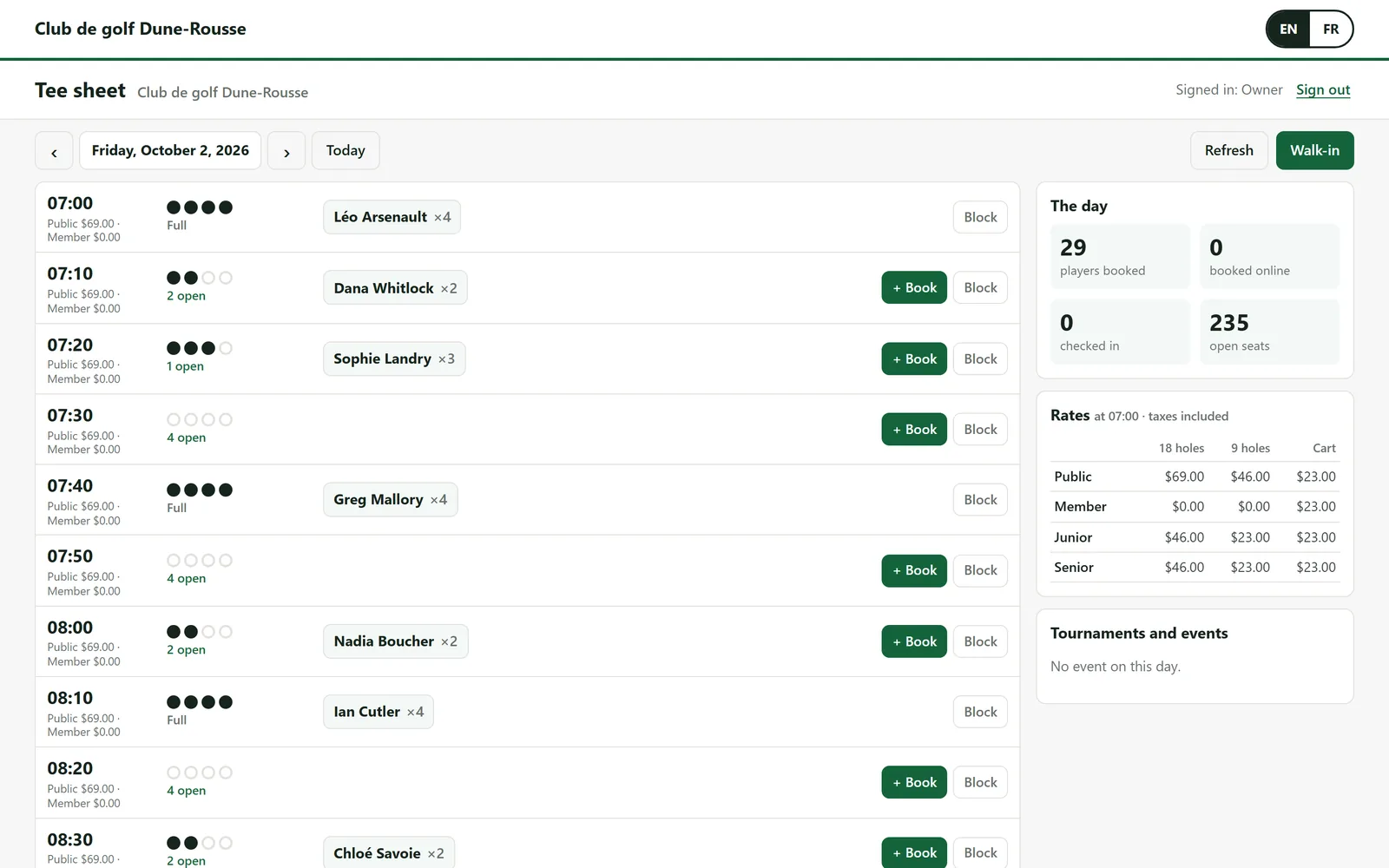
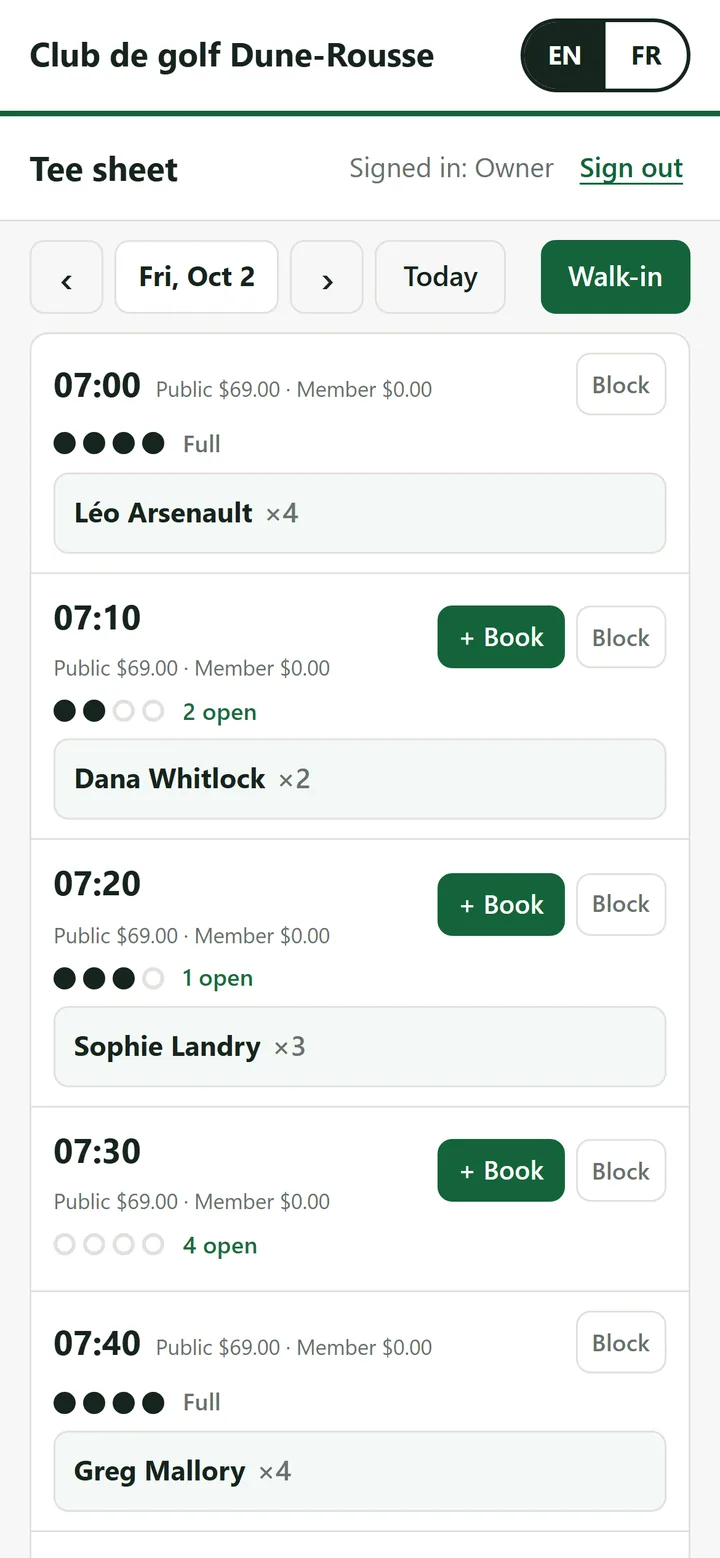
The real tee sheet, in a web browser on a laptop and a phone. A demo course with invented golfers: booked groups, open seats and the day’s rates, taxes included. Every screen
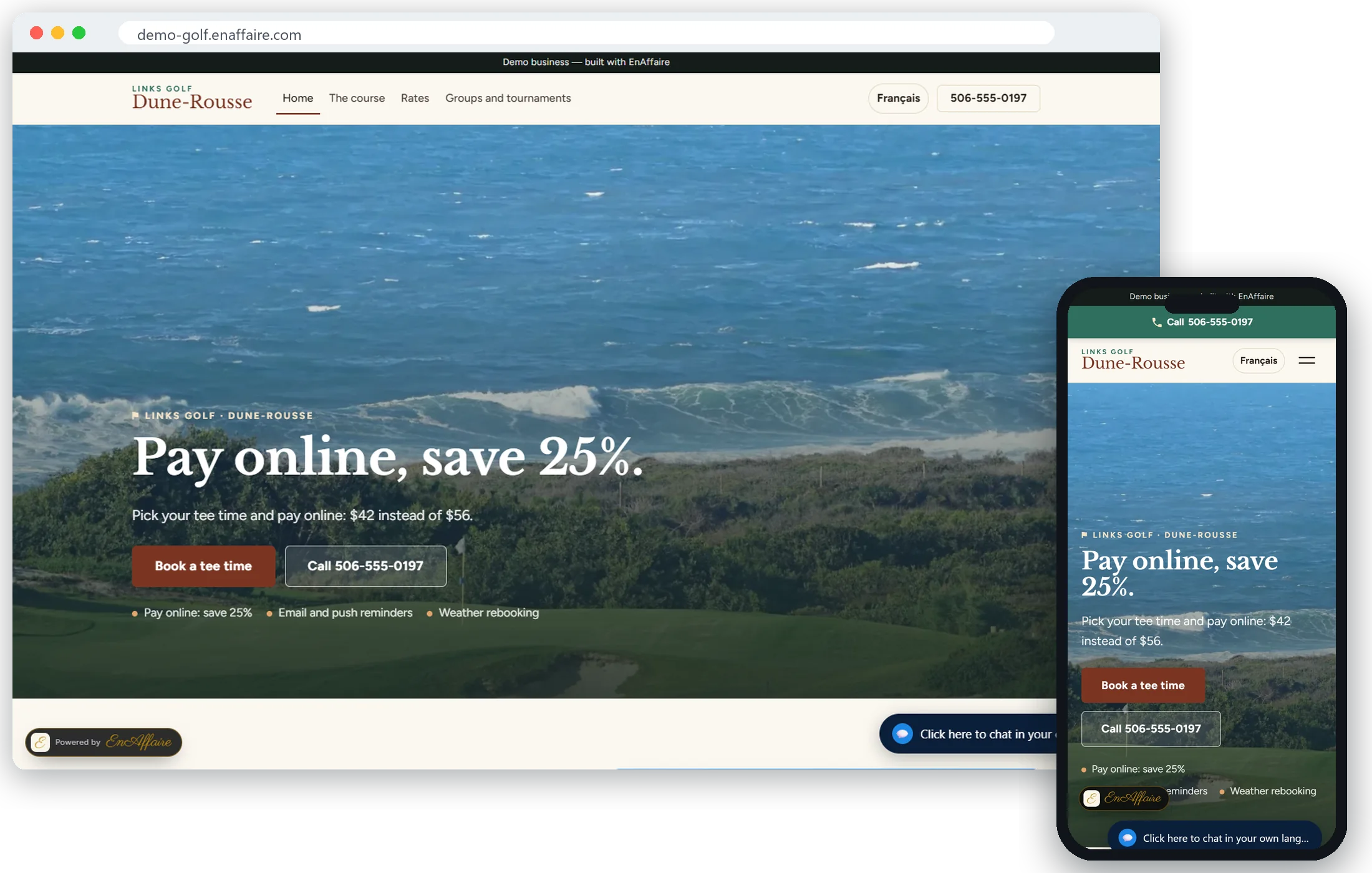
Dune-Rousse Golf Club is a fictional course running on MulliganOS. Pay online, save 25%: pick a tee time and pay with a test card.
Watch MulliganOS in 2 minutes
Golfers book and pay online, the tee sheet fills, the pro shop rings sales and the clubhouse board updates. A fictional course; every booking is invented. Watch on YouTube
MulliganOS Cloud
Open a browser. Run the day.
The tee sheet and online booking, on the computer in the pro shop, the tablet at the starter’s window or the phone in your pocket.
The tee sheet: add, move, edit and cancel bookings, take walk-ins, check groups in, mark no-shows and block times.
Online booking on your own page: golfers pick a time and pay when they book.
Every online booking lands on the sheet beside your staff’s, marked as online.
Staff sign in from any device with their own PIN.
Golfers get confirmations and day-before reminders by email and push.
English and French, for your staff and your golfers.
Start with just our premium online booking. Add the till whenever you want; your data comes with you.
Pricing
Keep every tee time. No barter, no booking fees.
Two plans, one monthly price all year, with payment processing through RKP. No booking fees and no commission on your tee times.
MulliganOS Booking
Start with just our premium online booking.
Regular price $129/month
$69/month
Introductory price until May 31, 2027
with payment processing through RKP
Courses that sign up by May 31, 2027 keep $69/month for as long as their account stays active with payment processing through RKP.
The tee sheet in any browser: computer, tablet or phone
Online tee-time booking from any computer or phone
“Pay online and save” pricing
Email and push reminders
Weather rebooking
Nothing to install
Not included: the till and pro shop, lessons, gift cards and memberships.
Cloud runs on what you already own. Add the till and its hardware is yours, no clawback.
No long-term lock
Stay because it works, not because a contract says so.
Offline guarantee on the dedicated terminal
If a sale or booking rung on the dedicated terminal while you were offline is ever lost, that month is free. How we measure it.
Any device
Nothing to install
Computers, tablets and phones you already have. Each staff member signs in with their own PIN.
One
One provider, one bill
Software and payments through RKP. Using another processor? Contact us.
$0
No per-booking fee
We do not take a cut of your tee times. The sheet does not cost more as it gets busier.
Local Atlantic
Local Atlantic support
Built here, supported here, in your time zone — by the people who wrote it, not a ticket queue several time zones away.
Who it’s for
Built for the people running the course
One system, six jobs. The tee sheet and online booking run in any browser; the pro shop, the grill, member accounts and the cash drawer run on the till.
General Manager
The day’s numbers without a second system to reconcile. Sales, green fees and what members owe, adding up to the cent.
Sales for today, this week, this month or the season, with discounts, comps and voids beside them.
Green-fee revenue split by the rate that priced it.
Every void, discount and comp names the person who authorised it.
Cash drawer shifts, X and Z reports and end-of-day reconciliation with over/short.
One tap exports the day for your accountant, with the same figures as the screen.
Need to keep selling when the internet drops? Put the till on a dedicated terminal.
The till runs in your browser, or on a dedicated terminal at the pro shop counter. The dedicated terminal is the one that keeps selling offline; the pro shop, the grill, member charges and integrated card terminals run on it.
The dedicated terminal is local-first by design. The tee sheet, pricing, order entry and cash tendering are computed on the terminal from local data and a local event journal. The sheet does not need our servers to be up to sell a tee time.
When the internet drops on a Saturday morning, the dedicated terminal keeps booking, pricing and selling, and the day reconciles itself when the line comes back.
Green fees, the pro shop and the grill ring, total and close offline.
A card taken on your own terminal records the same way — it never needed our connection.
Online seats are set aside on the dedicated terminal, so a time is never sold twice — even offline.
An online booking made while you were down arrives the moment the line comes back.
Our offline guarantee, on the dedicated terminal
If a sale or booking rung on the dedicated terminal while you were offline is ever lost, that month is free. We measure it ourselves, from our own logs, every month. How we measure it.
It’s the part of the demo worth seeing: we pull the network cable mid-sale.
What golfers notice first
Rain, lunch and who’s up next
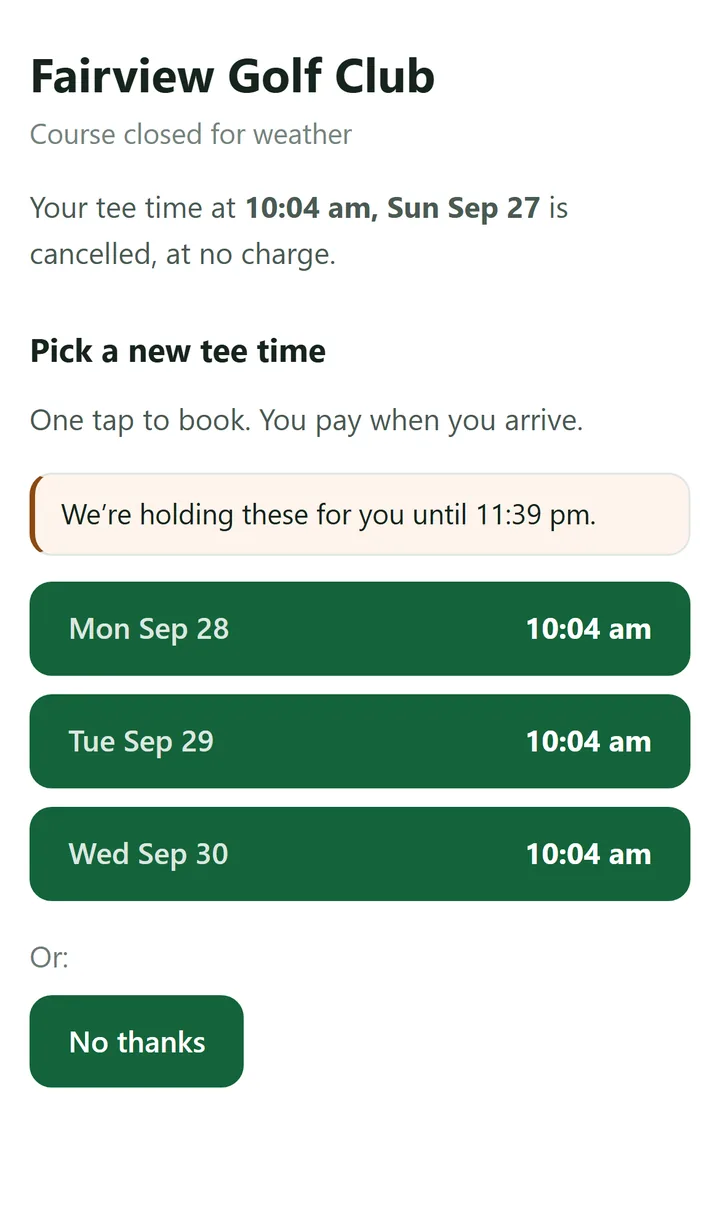
Rained out? Every golfer rebooks in one tap.
Close the course from the tee sheet and every booked golfer is sent the nearest open times, by email and push, held for them for thirty minutes. One tap books the new time, and anything they paid online moves with the booking. A golfer who would rather not gets a rain check or a refund, as your policy says.
Members are offered member times, inside their own booking window.
A dearer or cheaper time is worked out for you: the difference is paid at the counter or given back.
The Weather panel lists every golfer — offered, accepted, declined, no answer — with a call button for the ones to phone.
A frost delay pushes the morning back in order and tells everyone. An Environment Canada warning suggests the closure; nothing happens until staff tap.
Lunch from the course, without walking in.
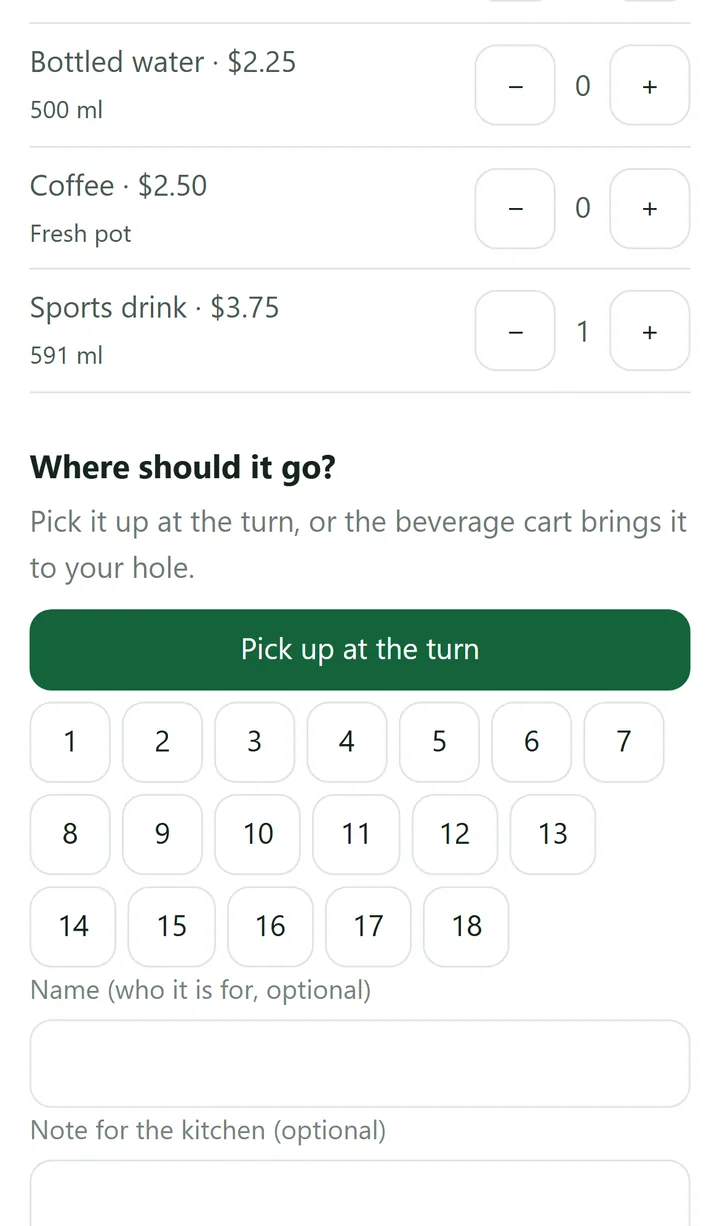
Every group gets an order link on the tee sheet. Mid-round, golfers order food and drinks on their phone: pick it up at the turn, or the beverage cart brings it to their hole.
The order lands on the till and the kitchen, on the group’s tab or a member’s account.
The cart’s phone shows orders by hole, with On my way and Delivered.
Your menu, your categories, in English and French.
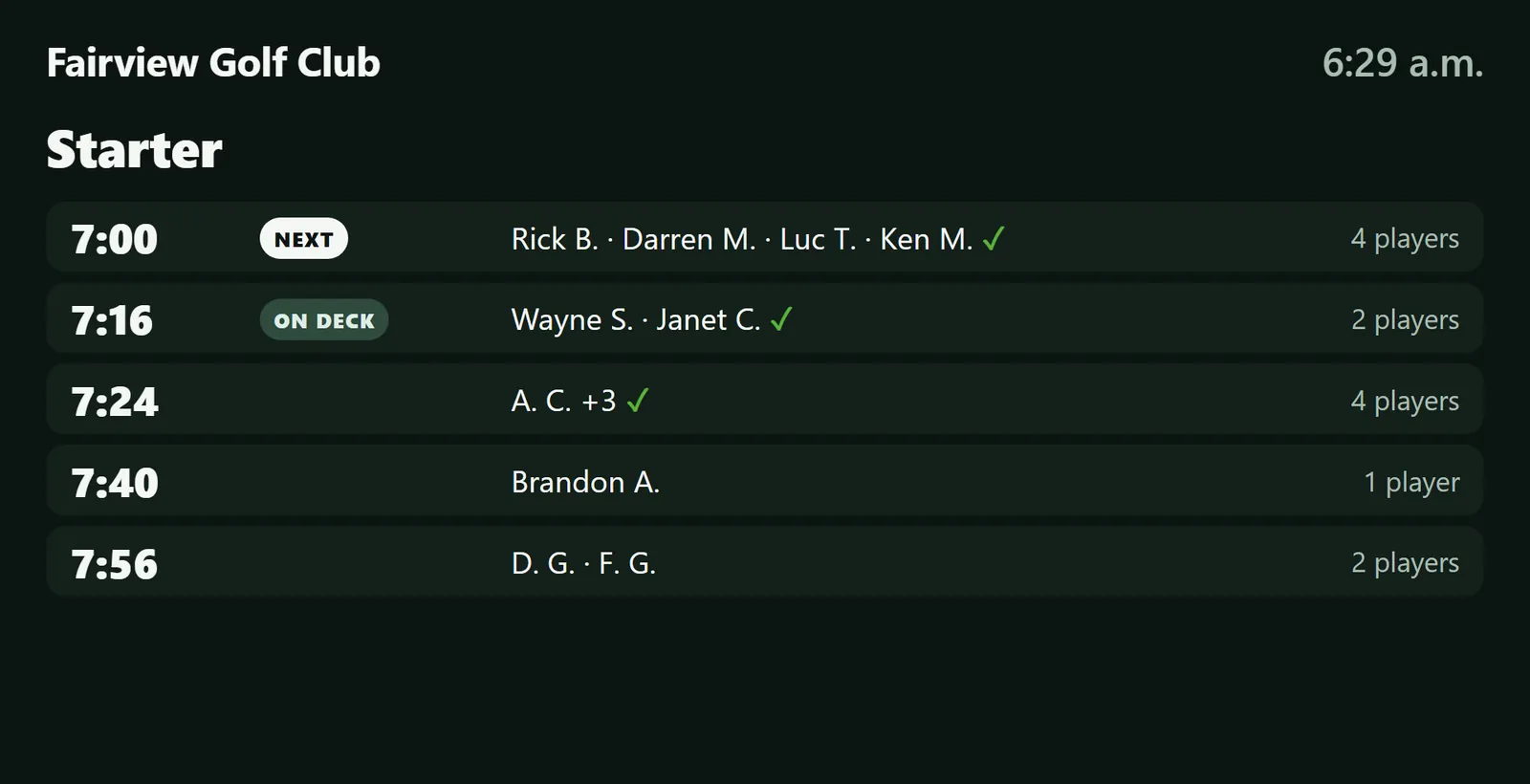
The starter board on the clubhouse TV.
Who is up next, course conditions, Environment Canada weather and your specials, on any TV with a browser. Call a frost delay or close the course at the till and the TV says so in the same minute.
Nobody updates it by hand: it reads the tee sheet.
English and French, in your colours.
What it does
Twelve things a course runs on
From the first tee time of the morning to the end-of-day report. The tee sheet and online booking run in any browser; the pro shop, the grill, inventory and counter payments run on the till.
Tee Sheet
Any interval you run, foursome capacity enforced per tee time, and holds the starter can read.
Captures of the real build on the till — not mockups, not renders.
01
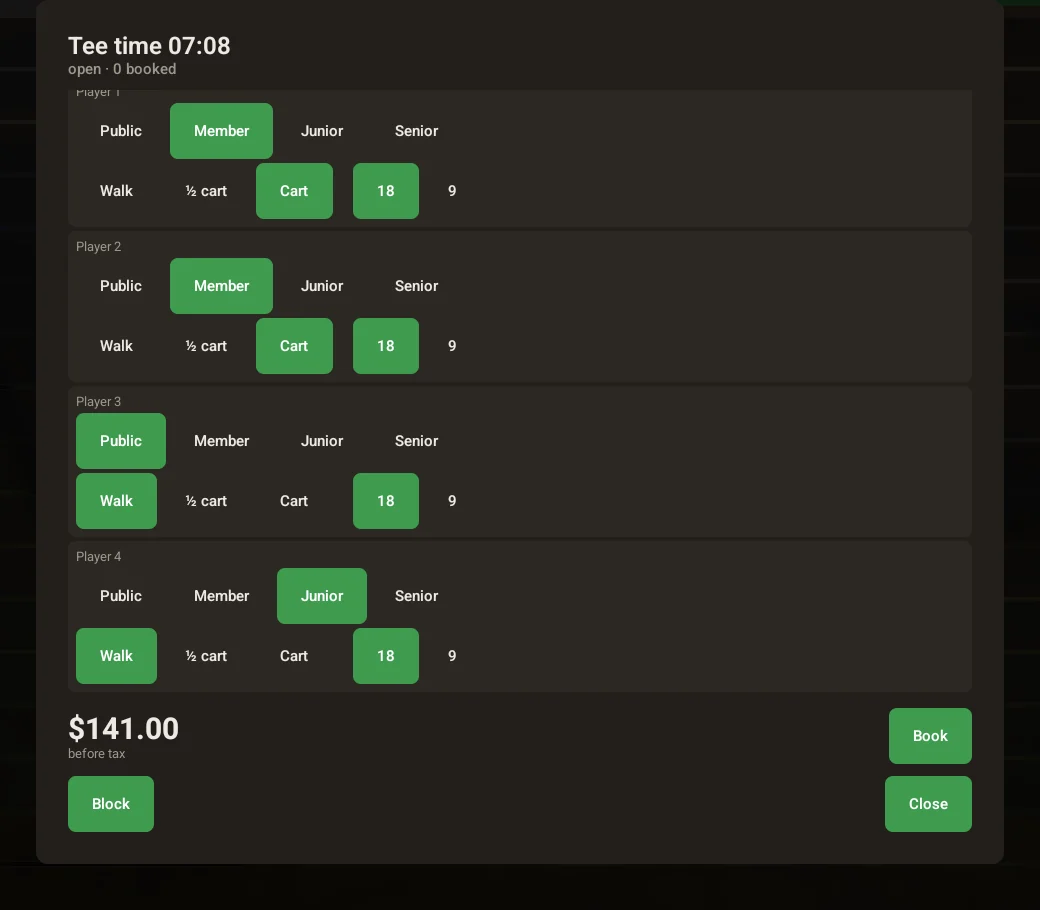
Price a group before you commit to it
Build the group at the counter — who is a member, who is a guest, who is walking and who is riding — and the total updates as you tap. Rates are yours to type in: by player type, hole count and cart kind, with time windows for a morning or twilight rate.
A player type with no price cannot be booked at all — it is never quietly sold at zero, and the rate card tells you which types are unpriced before a golfer finds out.
Here two members ride at no green fee because their dues cover it, a public golfer walks at the morning rate, and a junior walks. The counter sees $141.00 before tax — and it sees it before anyone has committed to anything.
02
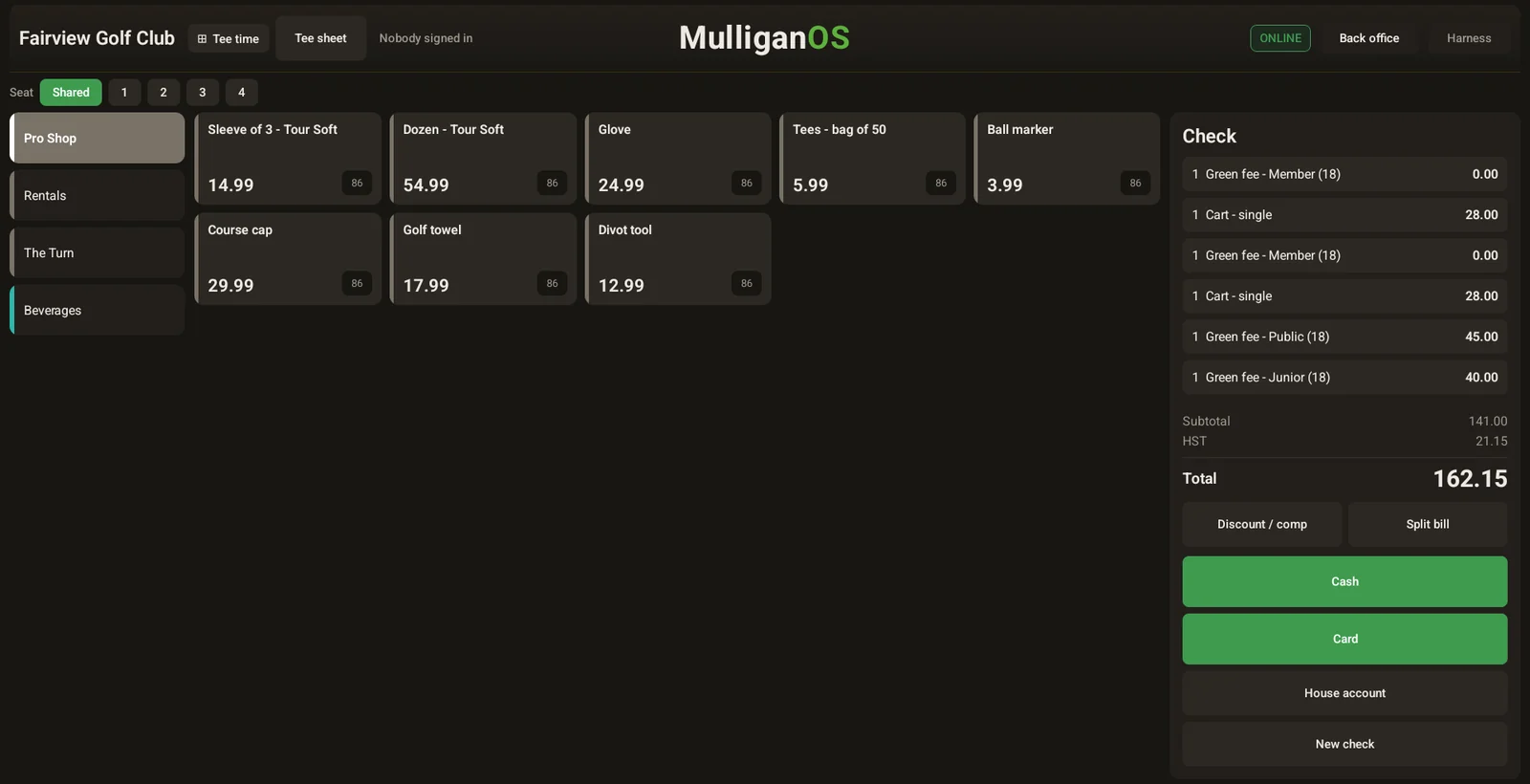
Check-in opens a real check
Checking a group in puts one green fee line — and a cart line for anyone riding — on the till, seated one per golfer. Tax is applied once on the whole, not per line.
Nothing is re-keyed. The sheet and the till are the same system.
03
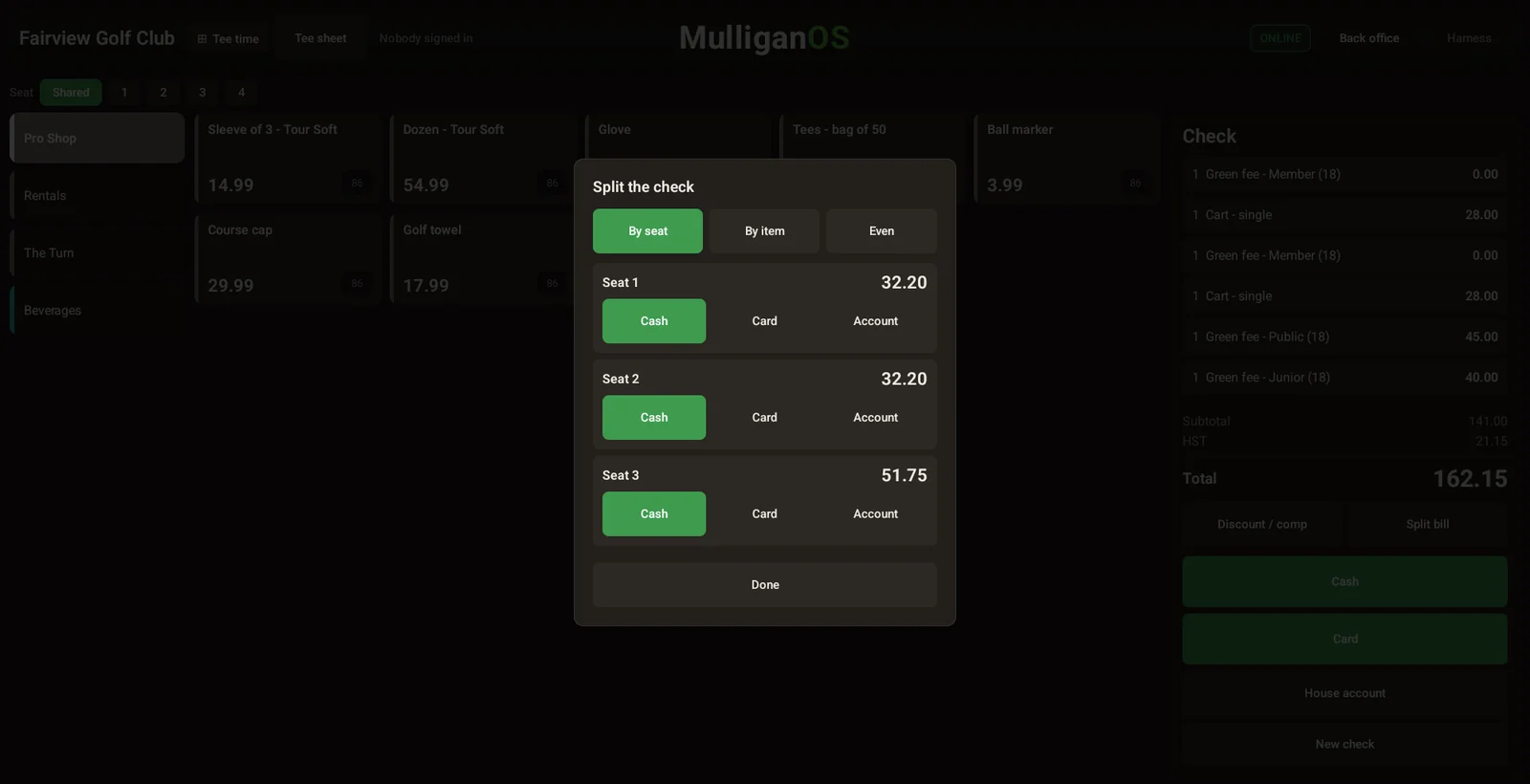
Split the foursome in one tap
The single most common transaction at a pro shop counter. Because each golfer is already a seat on the check, splitting it is one button — and the four parts add up to the total exactly, tax included.
04
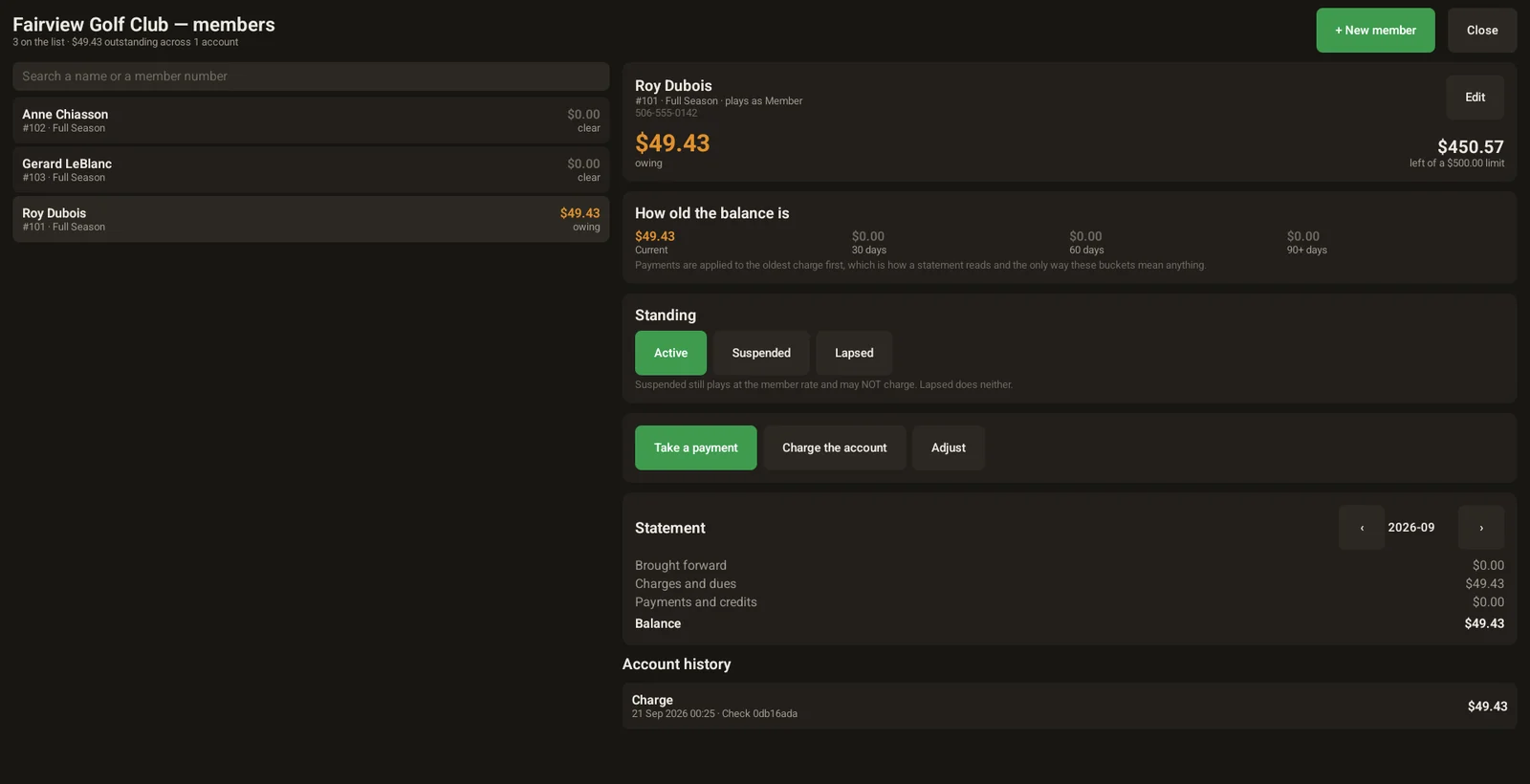
Member accounts that add up
What each member owes, and how old it is — current, thirty, sixty, ninety days. A payment lands on the oldest charge first, which is the only way those buckets ever mean anything.
Standing is explicit rather than implied: a suspended member still plays at the member rate but may not charge; a lapsed member does neither. The statement and the account history sit on the same screen as the balance.
On the dedicated terminal: the sheet sells without our servers
Card at online booking
Requires their own gateway
Through RKP, on the same bill as your software
Change the tee time interval without rebuilding
Delete all tee times and re-create them
Change it and the sheet re-renders
Hardware yours, no term lock
Depends on the Order Form — ask for it
No term lock, no clawback if you leave
Sources: Lightspeed Golf support documentation (creating tee times; configuring mandatory credit cards for reservations), the Lightspeed Golf pricing page, the Lightspeed Service Agreement, and Lightspeed Restaurant K-Series standalone-mode documentation. Checked September 2026.
Lightspeed and Lightspeed Golf are trademarks of Lightspeed Commerce Inc., used here for identification and comparison only. Comparison statements reflect publicly available documentation as of September 2026; verify current terms directly with the vendor.
Golf course software that starts in your browser. MulliganOS Cloud runs your tee sheet and online booking on the computers, tablets and phones you already have, with nothing to install. When you need the pro shop and the grill, add the till: in your browser, or on a dedicated terminal that keeps selling through an outage. Built and supported in Atlantic Canada.
Do I need to install anything?
No. Open MulliganOS Cloud in a web browser on any computer, tablet or phone. Each staff member signs in with their own PIN, in English or French.
Can I start with online booking only?
Yes. Start with just our premium online booking: the tee sheet and online booking in any browser. Add the till whenever you want; your data comes with you.
What happens when the internet drops?
Golfers keep booking, because your booking page runs on our servers, not on your clubhouse line. In a browser, the tee sheet and the till need a connection, like any web page. If your counter has to keep selling through an outage, put the till on a dedicated terminal. The tee sheet, pricing, order entry and cash tendering are computed on the terminal from local data and a local event journal, so an outage does not stop you booking or selling, and the day reconciles when the line comes back. If a sale or booking rung on the dedicated terminal while you were offline is ever lost, that month is free.
Can I keep my payment processor?
MulliganOS is priced with payment processing through RKP: one provider and one bill for your software and your payments, including a card at online booking. Using another processor? Contact us and we’ll look at your setup.
How hard is it to switch?
The parts that define your course are settings you type in, not a rebuild: your first and last tee, the interval, your player types and your rate card. There is nothing to install with Cloud, and there is no long-term lock. Book a demo and we will walk your own morning through it.
What support do I get?
Local support in your time zone. MulliganOS is written here and supported here, so when a terminal misbehaves during a Saturday shotgun, you are talking to the people who built the software — not a ticket queue several time zones away. HST, Atlantic seasons and a short golf year are the conditions it was built for.
Do I own the hardware?
MulliganOS Cloud needs no hardware from us: it runs on the devices you have. If you add the till, its hardware is yours, with no clawback if you leave, and nothing about the till is tied to one vendor’s hardware.
See it
Book a demo
We’ll show you the tee sheet and online booking running in a browser. If you want the till on a dedicated terminal, we’ll also pull the network cable mid-sale.